
What’s the best way to convert a color image to black and white?
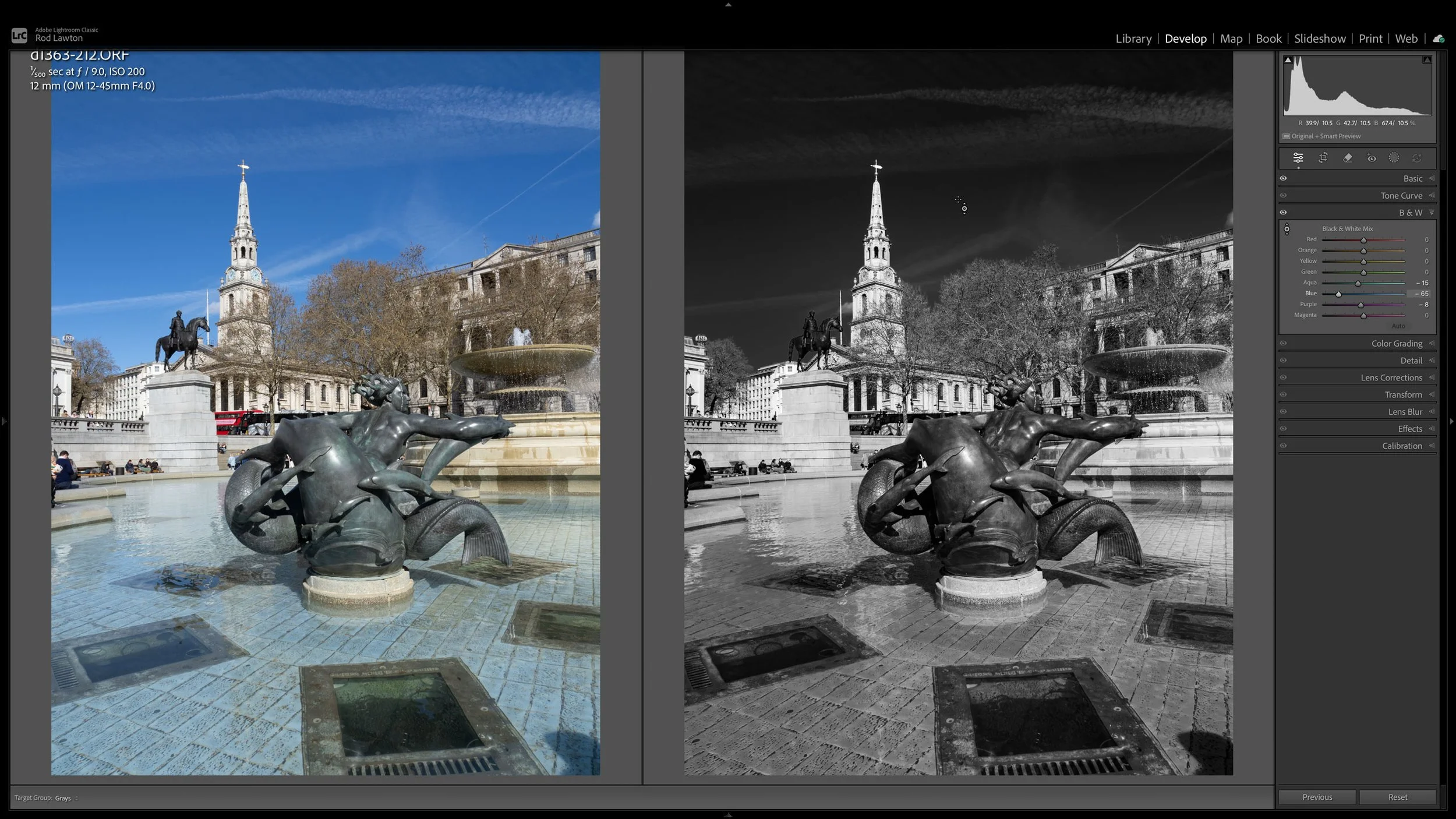
Things have changed! Black and white tools have become a lot more sophisticated and the methods used to convert black and white to colour have changed along with them. The old methods are no longer the best, so here’s a quick rundown on how black and white conversions were done in the past, and the best way to do them today.
Convert to grayscale: Definitely not! This was a quick and simple approach in Photoshop, back in the day, that swapped the image mode from RGB (three color channels) to a single grayscale channel. All the color information is lost and the image will have reduced scope for tonal adjustment because you can no longer control how different colors translate into shades of gray. Worse, grayscale is an old image mode that’s not even recognised or supported by many photo editing programs today.
Desaturate: Not as bad, but still a no-no in today’s world. The image stays in the RGB mode and you can alter the color conversion to a degree by reducing the saturation in one Photoshop adjustment layer, say, then modifying the white balance in another adjustment layer… but it’s all a very clumsy old-fashioned approach that’s just not as good as modern methods.
Channel Mixer: This was the tool that black and white photographers used back in the day because now, at last, it was possible to replicate black and white ‘contrast’ filters by adjusting the color values in the image. But black and white conversions were not really the main intention of this tool and you had to know what you were doing to get the best from it.
Black and White conversion tools: Today’s software offers black and white conversion based on multiple different color ranges with sliders to adjust their brightness in black and white. Typically you will also get ‘red’/’yellow’/’green’ and other filter presets to quickly mimic the effect of traditional black and white filters. This is the best method. to use for precise tonal control.
Profiles and LUTs: This is a new, alternative way to approach black and white conversions. LUTs (lookup tables) convert pixel values in the original image to new ones, and you can get LUTs for black and white conversions that sidestep traditional conversion tools with one-click ‘looks’ created (hopefully) by skilled designers and photographers. The downside is that you can’t control the conversion yourself, but the upside is that LUTs and Profiles (Lightroom) can also adjust contrast and exposure values and even apply effects like split-toning.
If you want full control over how your color images are rendered in black and white then the B&W panel in Lightroom and similar tools in other programs will do just that. Many presets will include tailored black and white conversions too. I also like LUTs and Profiles, though. You can think of these as ‘pre-processing’ tools ahead of any manual edits.
Happy shooting!